


Bone operation
Select and rotate an area (bone) of a 3D character.
Manipulators are displayed when you click an area in the [Document] window. These can be moved to rotate (bend or twist) parts.
|
|
Editing in the [Pose] group on the [Character information] palette can be done when the [Bone operation] sub tool is selected. However, editing in other groups cannot be done. |
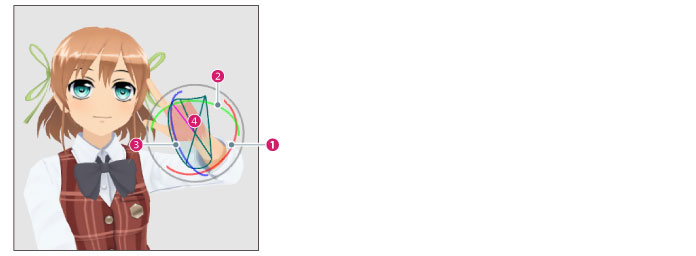
(1) Twisted rotation (red)
Drag along the red ring. Rotates the selected part in the direction of the ring.
(2) Bending rotation (green)
Drag along the green ring. Rotates the selected part in the direction of the ring.
(3) Bending rotation (blue)
Drag along the blue ring. Rotates the selected part in the direction of the ring.
(4) Movable range
Displays the range in which the part can be moved.
|
|
[Twisted rotation (red)], [Bending rotation (green)], [Bending rotation (blue)] are only displayed when rotation in the corresponding direction is possible. |