


When a texture in a facial expression is selected
The following settings can be configured in the [Character information] palette when a [Texture] stored in [Facial expression] in the [Character configuration] palette is selected.
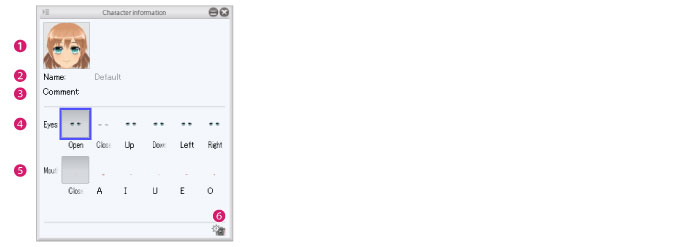
(1) Thumbnail
The thumbnail of the [Facial expression]. Click the thumbnail to display the [Capture thumbnail] window where a thumbnail can be captured for the facial expression. For information on how to configure this, see "Capturing a Thumbnail" .
(2) Name
Displays the name of the edited facial expression. Double clicking the field allows you to enter a facial expression name. The input name is applied to the [Character configuration] palette.
|
|
The [Names] created in the default settings ([Default], [Smile], [Anger] and [Sad]) cannot be changed by double clicking. |
(3) Comment
A comment about the [Facial expression] can be set. Right click the item name to input text. Information such as a description can be entered here.
(4) Eyes
Click each button to switch the eye expression of the 3D character.
(5) Mouth
Click each button to switch the mouth expression of the 3D character.
(6) Capture component thumbnail
Click the thumbnail to display the [Capture thumbnail] window where a thumbnail can be captured for the selected [Eye] or [Mouth] expression. For information on how to configure this, see "Facial Expressions for Characters" .