


Simple tone settings Dialog Box [PRO/EX]
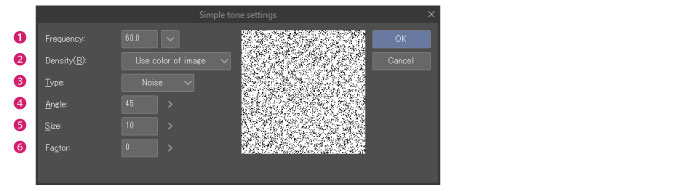
(1) Frequency
Specify the number of screentone lines per inch. The larger the value, the smaller will be the halftone dot.
(2) Density
Configure the method for specifying the tone density.
|
Use color of image |
Configures the tone density based on the image color. |
|
Use brightness of image |
Configures the tone density based on the image brightness. |
|
|
When the material is a [Fill in monochrome] layer, [Density] must be specified numerically. |
(3) Type
Select the shape of the tone from [Circle], [Square], [Lozenge], [Line], [Cross], [Ellipse], [Noise], [Sugar plum], [Asterisk], [Star], [Carrot], [Cherry (round)], [Cherry (mid)], [Cherry (thin)], [Flower (round)], [Flower (mid)], [Flower (thin)], [Clover (round)], [Clover (thin)], [Ninja star], [Diamond], [Heart], [Clubs], and [Spades].
(4) Angle
Configure the angle of the tone (halftone dot).
(5) Size
Configure the noise size. You can configure this item when Noise is selected for [Type].
(6) Factor
Configure the noise factor. You can configure this item when Noise is selected for [Type].