


Using the Root Manipulator
When the animation controller is displayed for a 3D character material, a root manipulator is displayed too.
You can use the root manipulator to move and rotate entire 3D character materials.
|
|
The root manipulator cannot be used for 3D character materials compatible with Version 1.5. |
Operating the Root Manipulator
Drag the arrow or ring of the root manipulator with the mouse cursor.
The 3D character material moves in the dragged direction.
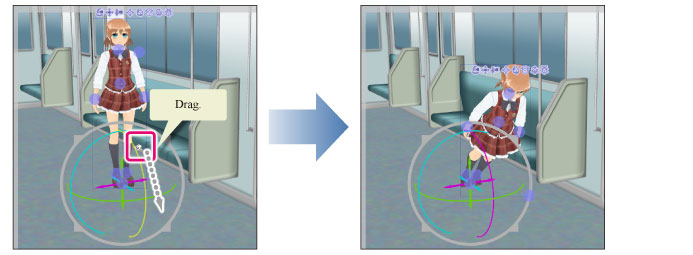
|
|
For details on the directions in which the root manipulator can be moved, see "Names of parts of root manipulator". |
Names of parts of root manipulator
The root manipulator can be moved in the following directions.
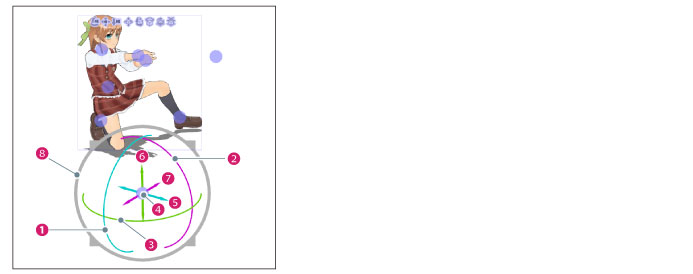
(1) Rotate left/right
Drag along the blue ring. The 3D character material will rotate along with the ring.
(2) Rotate forward/back
Drag along the [Purple] ring. The 3D character material will rotate along with the ring.
(3) Rotate
Drag along the green ring. The 3D character material will rotate along with the ring.
(4) Controller
Click and drag with the mouse cursor. The 3D character material will move in the ring's dragged direction.
(5) Move forward/back
Drag in the direction of the blue arrow. The 3D character material will move in the arrow's direction.
(6) Move left/right
Drag in the direction of the [Purple] arrow. The 3D character material will move in the arrow's direction.
(7) Move up/down
Drag in the direction of the green arrow. The 3D character material will move in the arrow's direction.
(8) Scale
Dragging inward will scale down the 3D character material.
Dragging outward will scale up the 3D character material.